AI Smart Zone Selector

About this project
Feature / Tool
Zoning / Heatmap analysis
Learn more
→
Duration
4 months
Role
Lead Product Designer
User research
Years
2022
The problem
Heatmap Analysis is Contentsquare’s most critical tool (used by 55% of users exclusively) allowed customers to:
→ Highlight webpage elements (e.g., <DIV>)
→ Overlay metrics (e.g., conversion rates) for insights
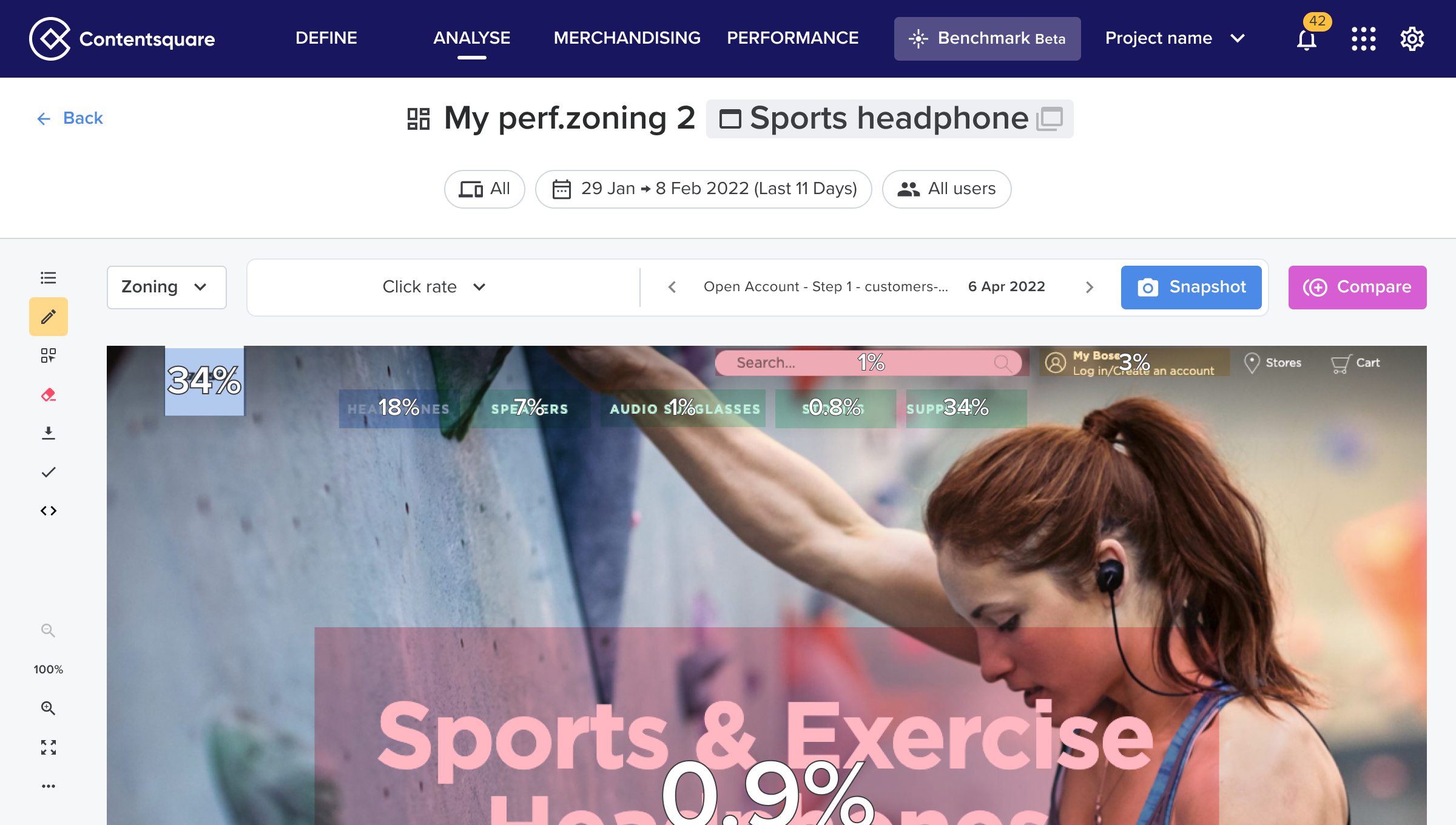
⚠️ This was the version of the product when I joined the company (2013)
40%
of users didn’t find useful insights using the tool
4 min
time-to-first-value (time spend in between first click on the platform and first KPI value displayed)
7/10
Users called at least 4 times the CSM experts to find value on the tool
How might we simplify the zone creation flow to reduce time-to-value?
Solution
Solution 1: Auto-zoning
The first solution we explored was to automatically zone every zone of the page, so the user would have to do it manually
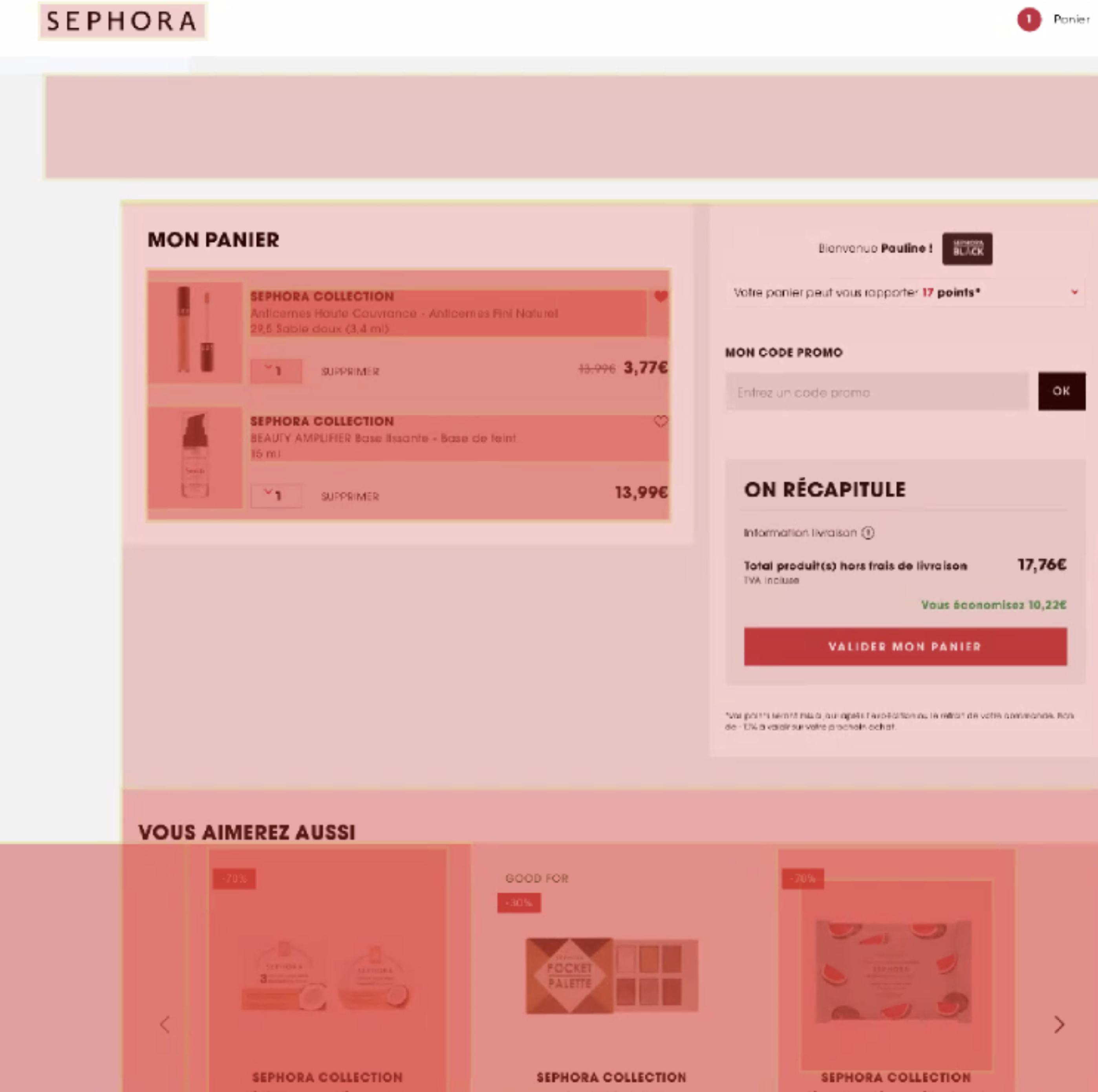
Pros
✅ No more manual delimitation of the zones
✅ User immediately discovers all existing zones
Cons
❌ Crowded and possibly unreadable view as we display every possible zone available.
❌ No hierarchy ->
❌ Confusing actions for users.
Solution 2: Zone advanced filtering
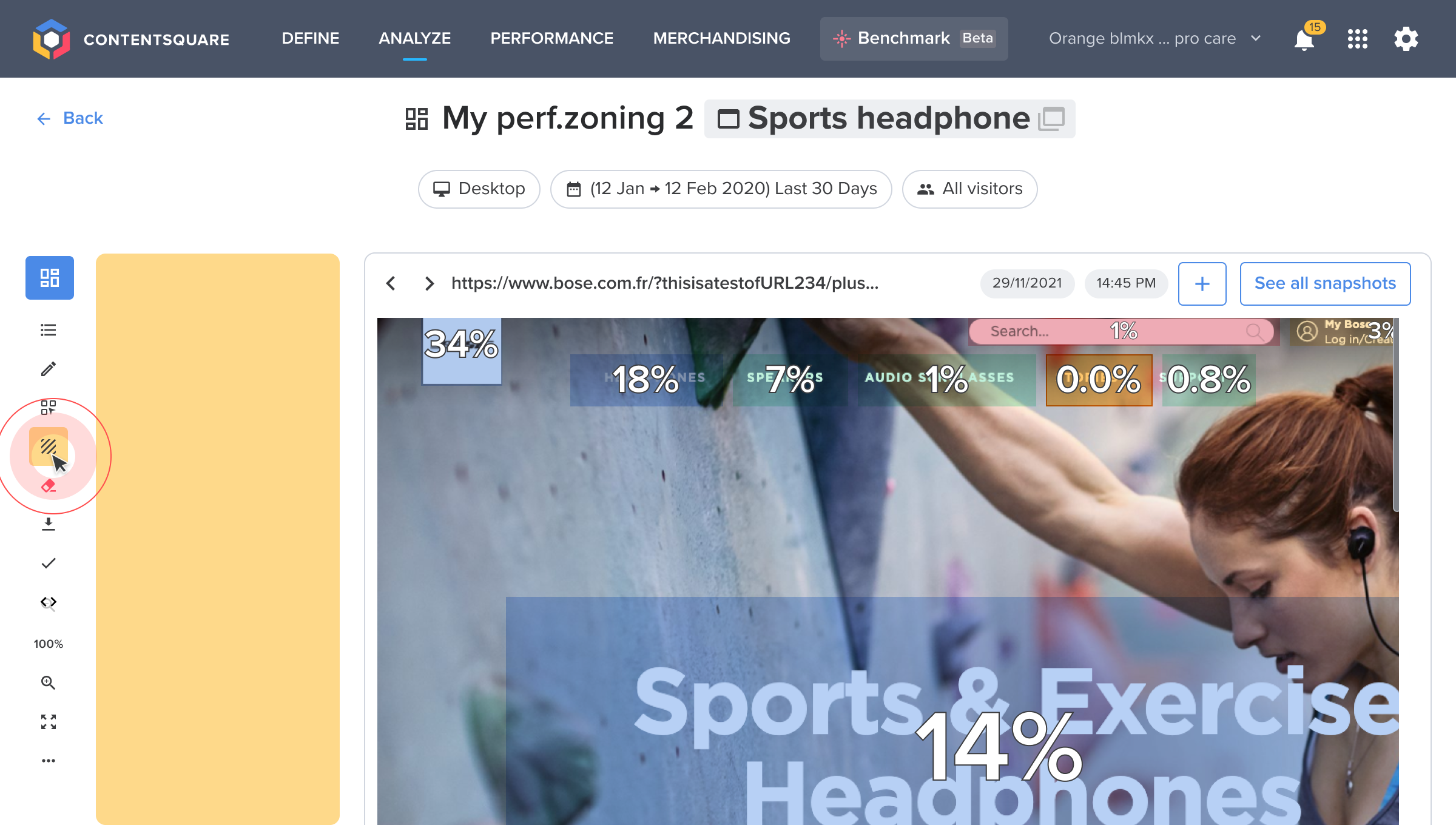
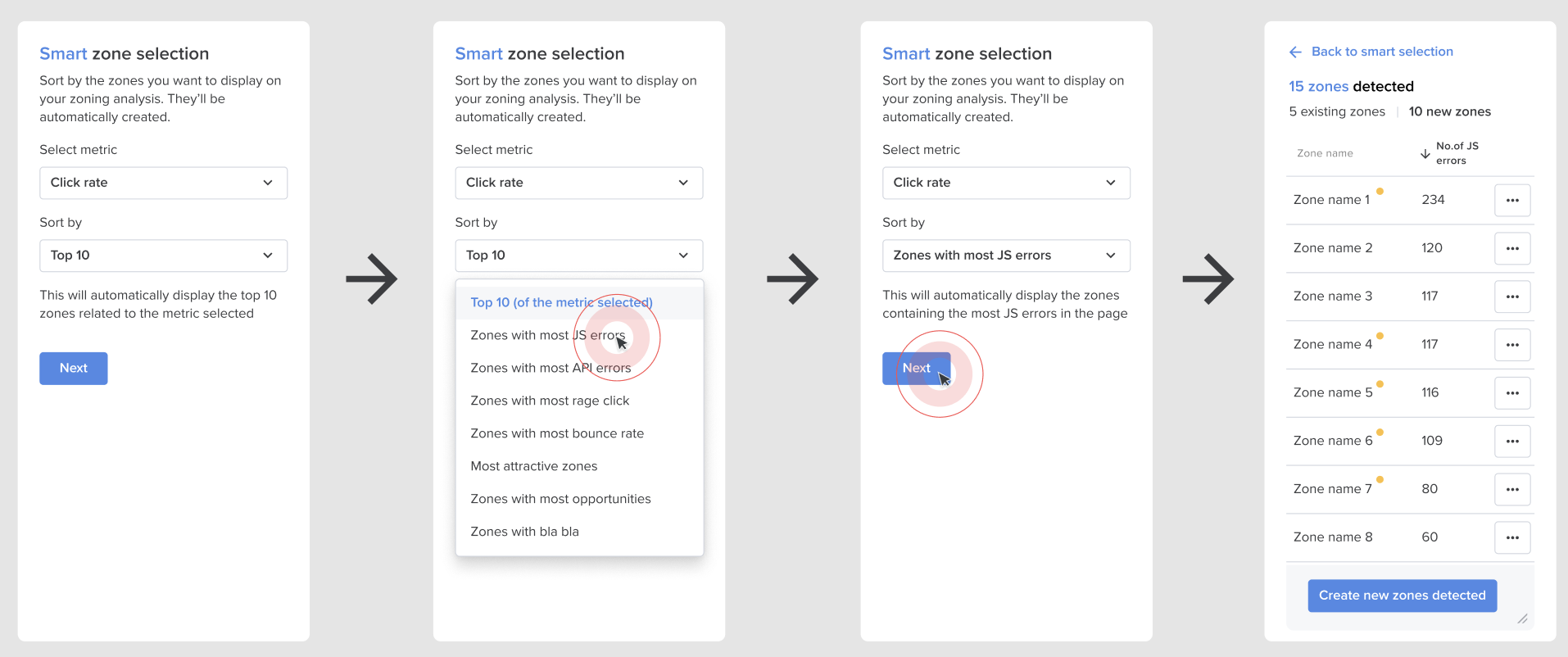
The second solution we explored was to possibility to train an AI model to recognize “critical zones” and auto-select them based on the metric targeted by the user.
Pros
✅ No more manual delimitation of the zones
✅ Only the top zones of the page would be selected
✅ Based on an AI model this feature would aim to deliver instant value to the user without them having to select anything
Cons
❌ This feature needs still to select a metric
❌ The user still needs to understand who to interpret the metric VS having a clearer insight
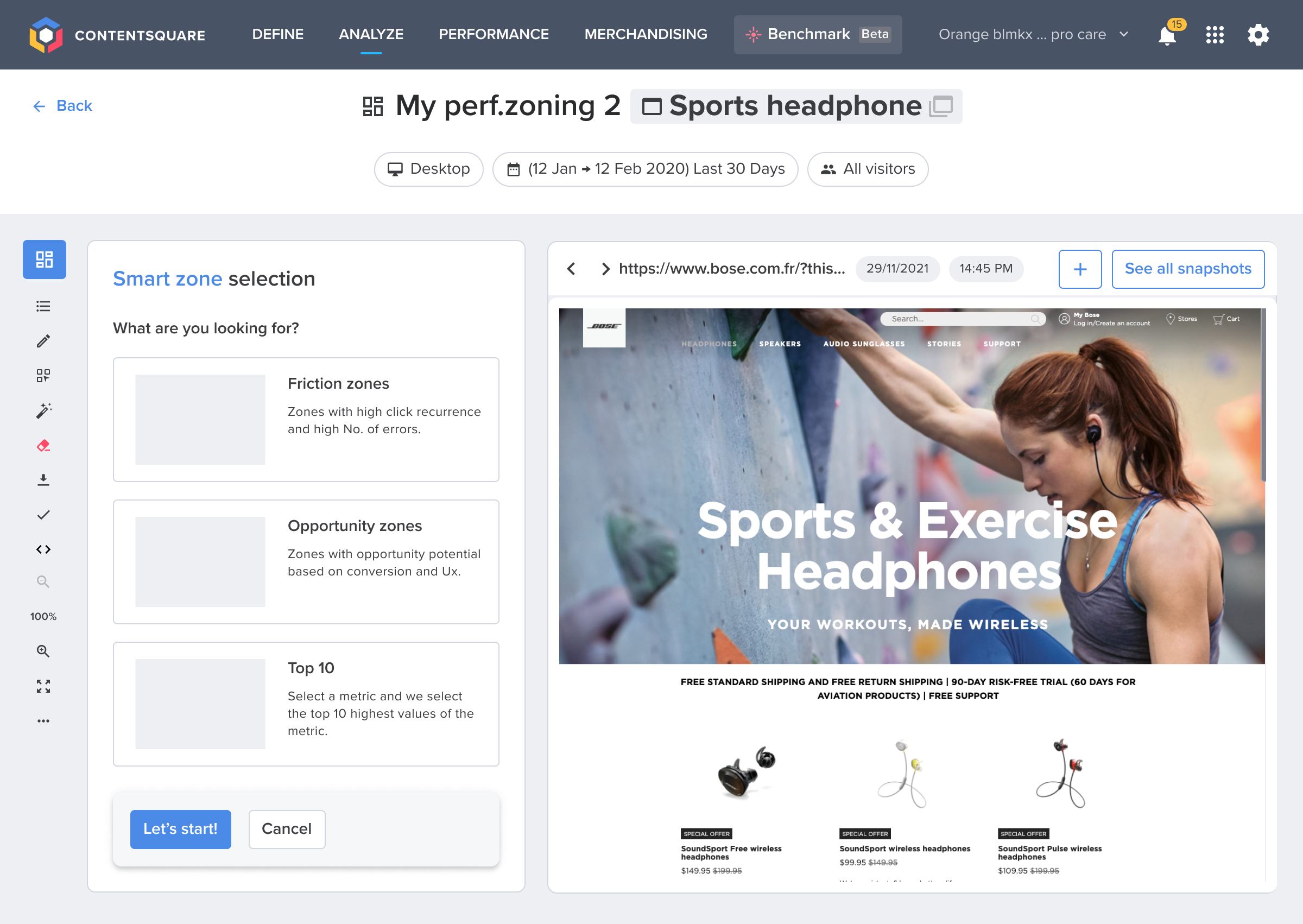
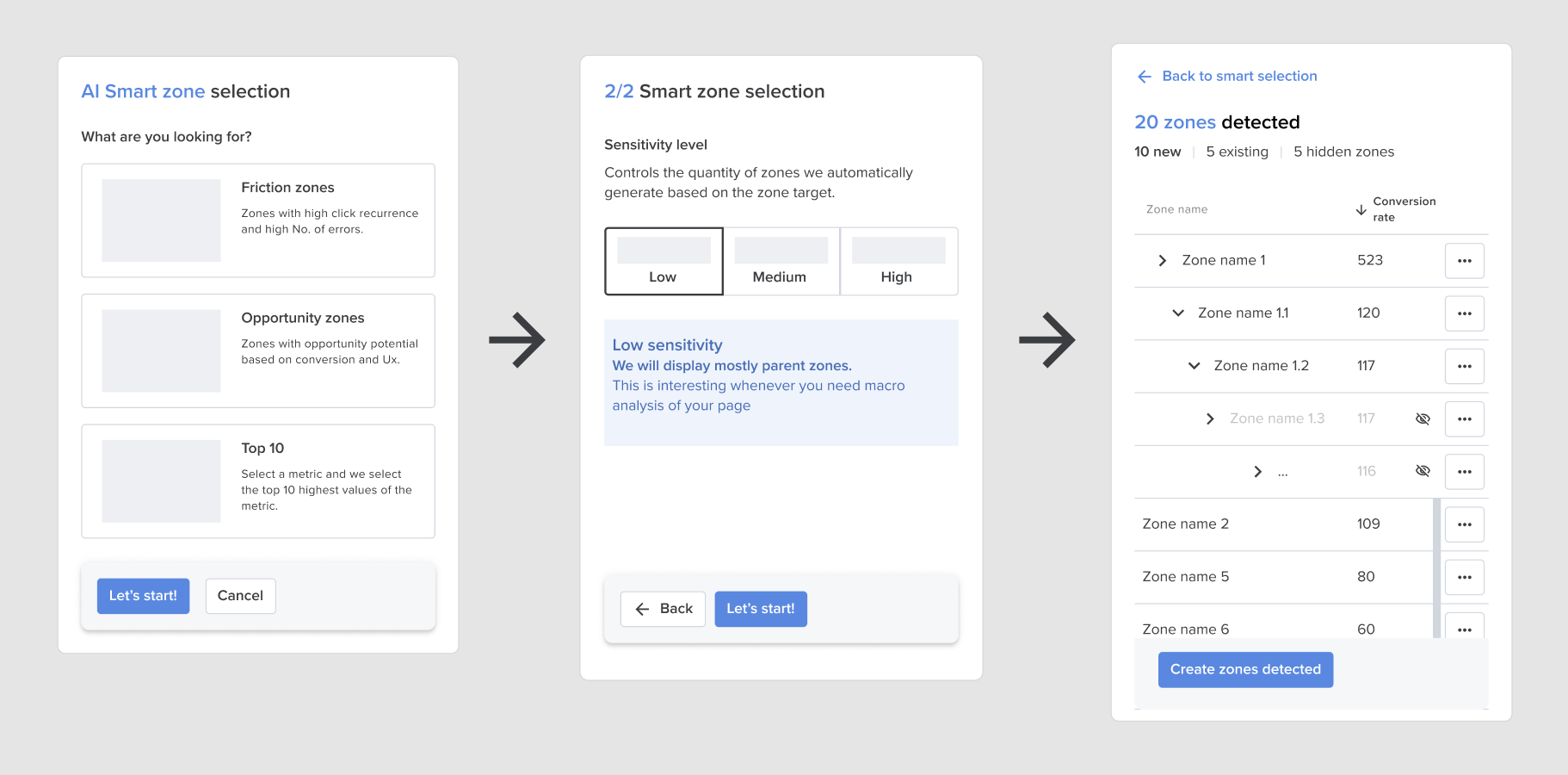
Solution 3: AI Zone selector based on user use cases
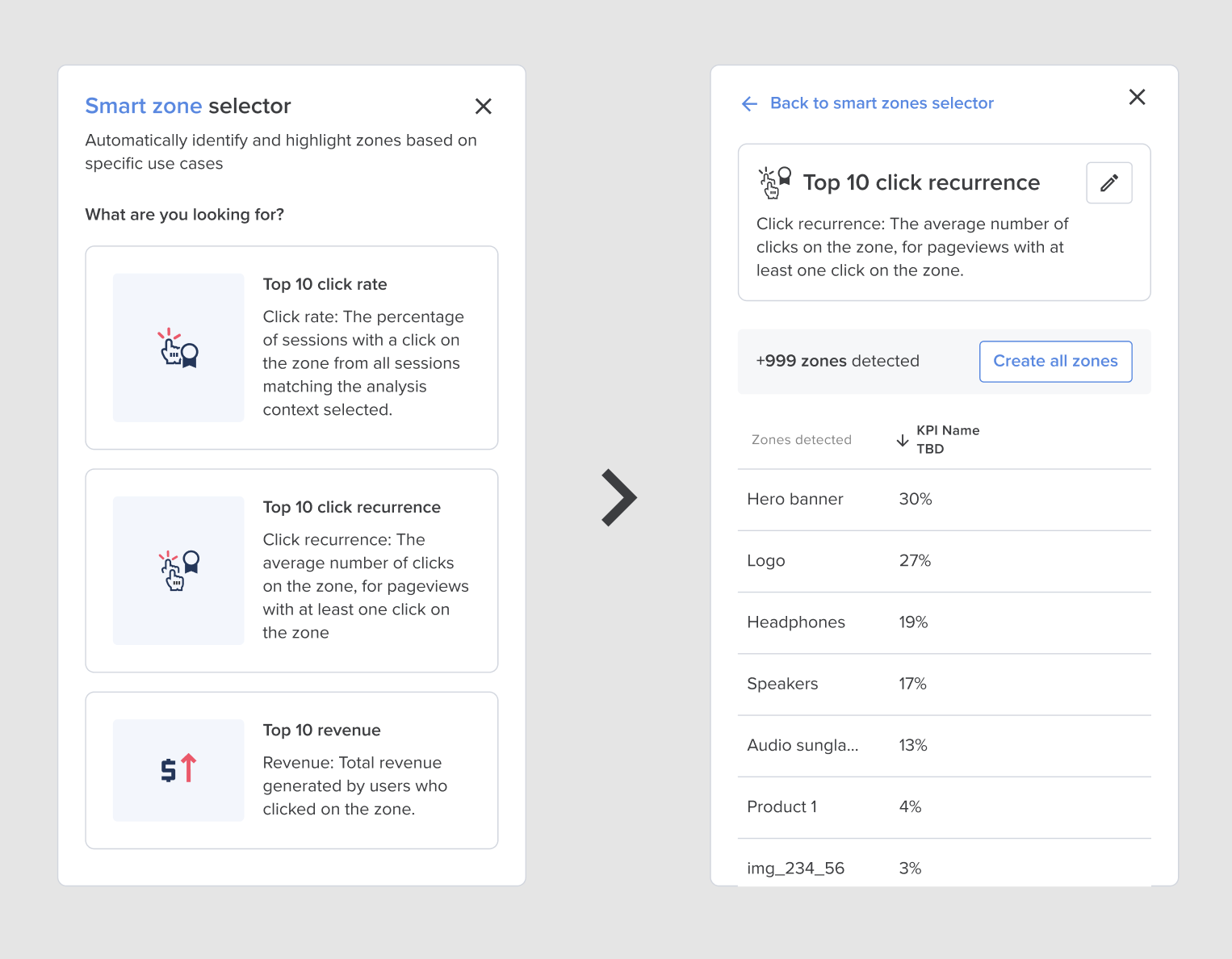
Based on the second exploration this time we decided to be use-case focused to ensure we have a more accessible tool for our “non-expert” users. Instead of choosing a metric, the user would choose the use-case they need to tackle and the AI would automatically select the zones for them.
Pros
✅ Use-case oriented feature
✅ Easy to use for new users, which will lead to a better adoption of the product
✅ Time to value considerably diminushed
Cons
❌ It will take a lot of time to train the AI on more complicated use cases
❌ Micro stepper to introduce the feature could discourage users to use the feature
Results
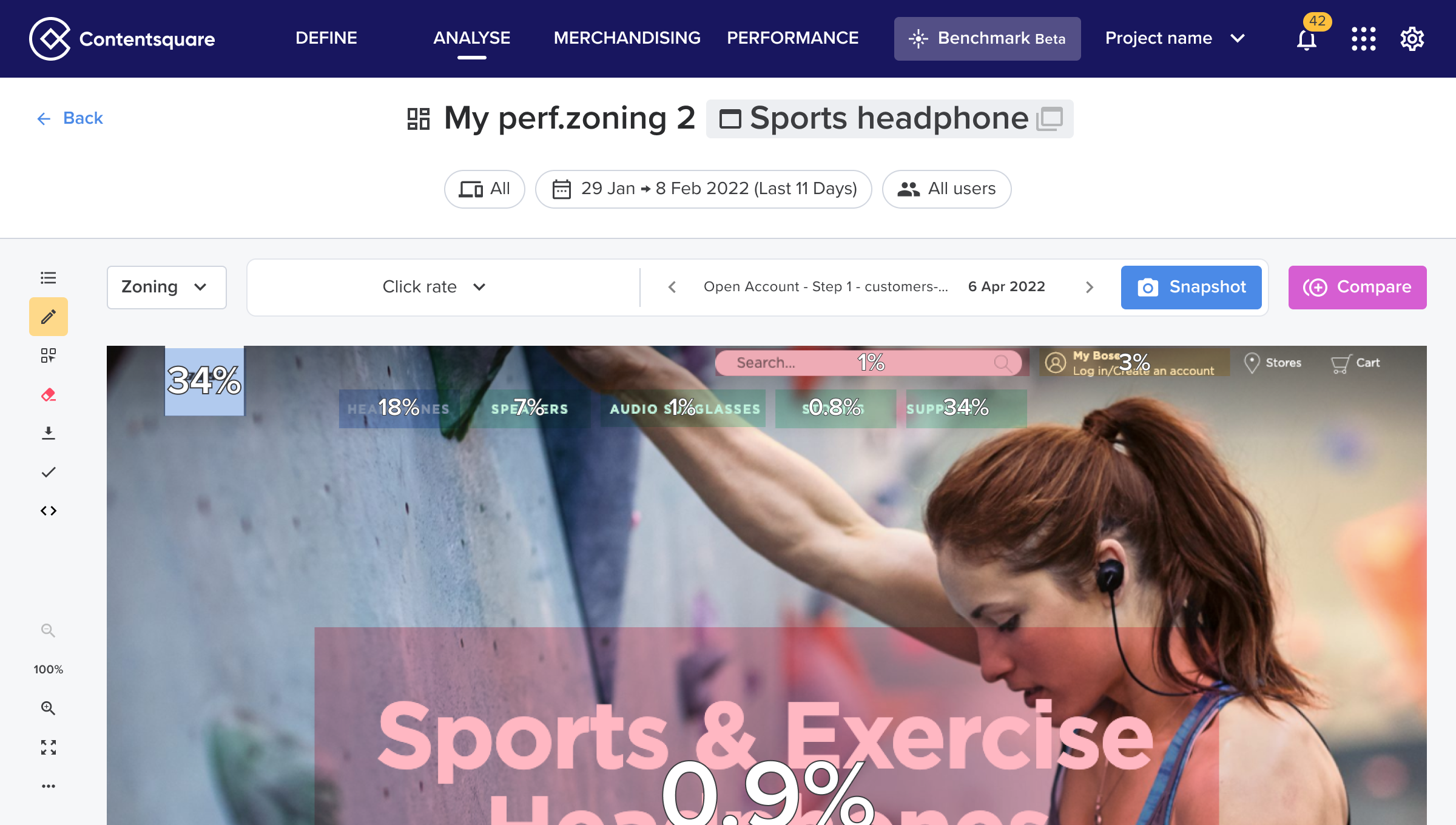
Before:
❌ Manual selection
❌ The user needed to “guess” which zone tu create and why
❌ Time to value > 4min30

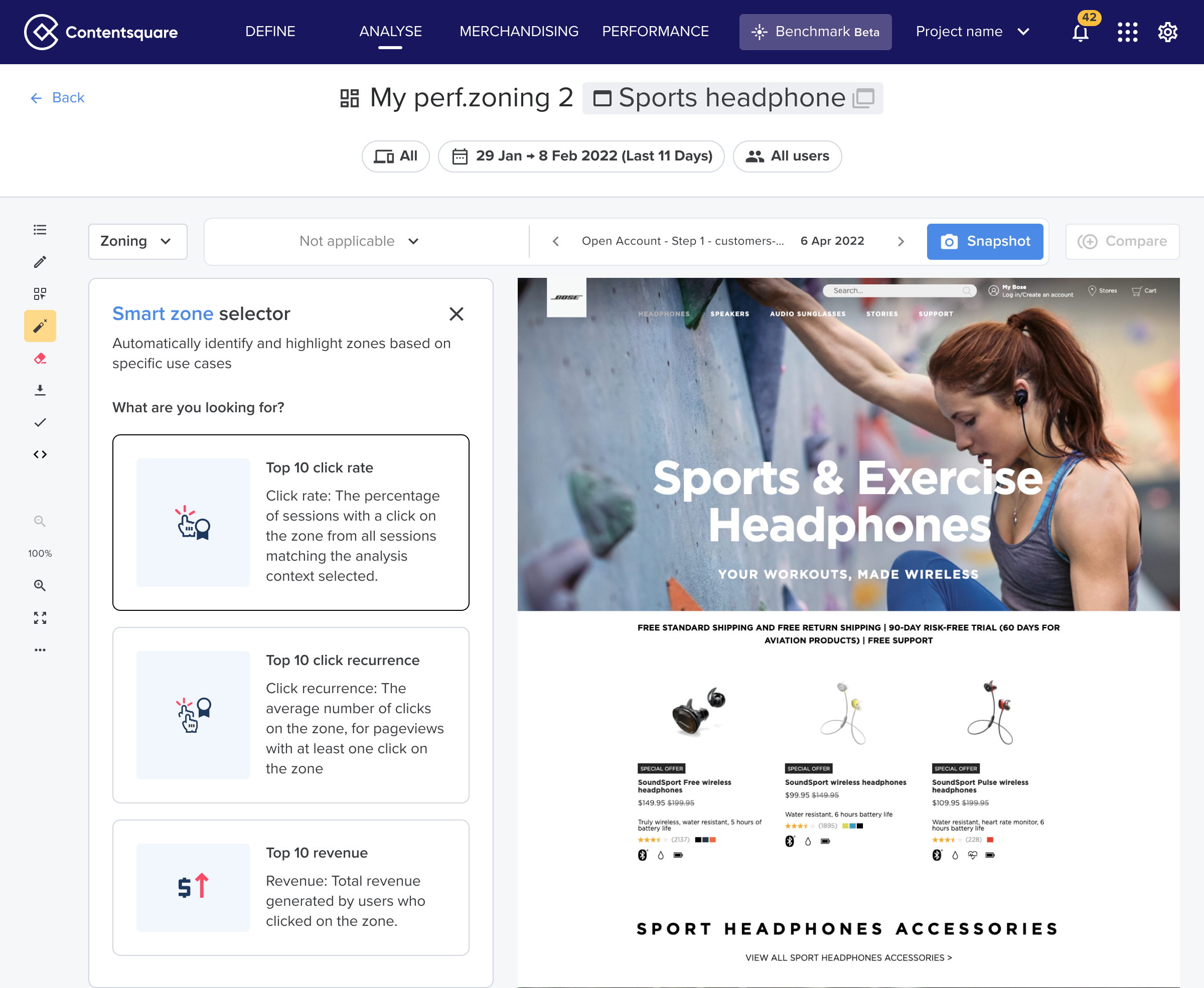
After:
✅ Streamlined structure with a single toolbar.
✅ Simplified micro-interactions and reduced cognitive load.
✅ Future proof for new upcoming features
+12%
adoption rate for first time users
8/10
of users found the new layout “easy to use”
-66%
on feedback tickets cited cognitive overload (after 6 months)

More Contentsquare Projects

See Project
→

See Project
→
Other Projects
See Project
→
See Project
→
AI Smart Zone Selector

About this project
Feature / Tool
Zoning / Heatmap analysis
Learn more
→
Duration
4 months
Role
Lead Product Designer
User research
Years
2022
The problem
Heatmap Analysis is Contentsquare’s most critical tool (used by 55% of users exclusively) allowed customers to:
→ Highlight webpage elements (e.g., <DIV>)
→ Overlay metrics (e.g., conversion rates) for insights
⚠️ This was the version of the product when I joined the company (2013)
40%
of users didn’t find useful insights using the tool
4 min
time-to-first-value (time spend in between first click on the platform and first KPI value displayed)
7/10
Users called at least 4 times the CSM experts to find value on the tool
How might we simplify the zone creation flow to reduce time-to-value?
Solution
Solution 1: Auto-zoning
The first solution we explored was to automatically zone every zone of the page, so the user would have to do it manually
Pros
✅ No more manual delimitation of the zones
✅ User immediately discovers all existing zones
Cons
❌ Crowded and possibly unreadable view as we display every possible zone available.
❌ No hierarchy ->
❌ Confusing actions for users.
Solution 2: Zone advanced filtering
The second solution we explored was to possibility to train an AI model to recognize “critical zones” and auto-select them based on the metric targeted by the user.
Pros
✅ No more manual delimitation of the zones
✅ Only the top zones of the page would be selected
✅ Based on an AI model this feature would aim to deliver instant value to the user without them having to select anything
Cons
❌ This feature needs still to select a metric
❌ The user still needs to understand who to interpret the metric VS having a clearer insight
Solution 3: AI Zone selector based on user use cases
Based on the second exploration this time we decided to be use-case focused to ensure we have a more accessible tool for our “non-expert” users. Instead of choosing a metric, the user would choose the use-case they need to tackle and the AI would automatically select the zones for them.
Pros
✅ Use-case oriented feature
✅ Easy to use for new users, which will lead to a better adoption of the product
✅ Time to value considerably diminushed
Cons
❌ It will take a lot of time to train the AI on more complicated use cases
❌ Micro stepper to introduce the feature could discourage users to use the feature
Results
Before:
❌ Manual selection
❌ The user needed to “guess” which zone tu create and why
❌ Time to value > 4min30

After:
✅ Streamlined structure with a single toolbar.
✅ Simplified micro-interactions and reduced cognitive load.
✅ Future proof for new upcoming features
+12%
adoption rate for first time users
8/10
of users found the new layout “easy to use”
-66%
on feedback tickets cited cognitive overload (after 6 months)

More Contentsquare Projects
See Project
→
See Project
→
Other Projects
See Project
→
See Project
→
AI Smart Zone Selector

About this project
Feature / Tool
Zoning / Heatmap analysis
Learn more
→
Duration
4 months
Role
Lead Product Designer
User research
Years
2022
The problem
Heatmap Analysis is Contentsquare’s most critical tool (used by 55% of users exclusively) allowed customers to:
→ Highlight webpage elements (e.g., <DIV>)
→ Overlay metrics (e.g., conversion rates) for insights
⚠️ This was the version of the product when I joined the company (2013)
40%
of users didn’t find useful insights using the tool
4 min
time-to-first-value (time spend in between first click on the platform and first KPI value displayed)
7/10
Users called at least 4 times the CSM experts to find value on the tool
How might we simplify the zone creation flow to reduce time-to-value?
Solution
Solution 1: Auto-zoning
The first solution we explored was to automatically zone every zone of the page, so the user would have to do it manually
Pros
✅ No more manual delimitation of the zones
✅ User immediately discovers all existing zones
Cons
❌ Crowded and possibly unreadable view as we display every possible zone available.
❌ No hierarchy → Not every zone is important, there is a lot of distractions.
❌ This POC seems already very bussy, we still have to display KPI values on the zones.
Solution 2: Zone advanced filtering
The second solution we explored was to possibility to train an AI model to recognize “critical zones” and auto-select them based on the metric targeted by the user.
Pros
✅ No more manual delimitation of the zones
✅ Only the top zones of the page would be selected
✅ Based on an AI model this feature would aim to deliver instant value to the user without them having to select anything
Cons
❌ This feature needs still to select a metric
❌ The user still needs to understand who to interpret the metric VS having a clearer insight
Solution 3: AI Zone selector based on user use cases
Based on the second exploration this time we decided to be use-case focused to ensure we have a more accessible tool for our “non-expert” users. Instead of choosing a metric, the user would choose the use-case they need to tackle and the AI would automatically select the zones for them.
Pros
✅ Use-case oriented feature
✅ Easy to use for new users, which will lead to a better adoption of the product
✅ Time to value considerably diminushed
Cons
❌ It will take a lot of time to train the AI on more complicated use cases
❌ Micro stepper to introduce the feature could discourage users to use the feature
Results
Before:
❌ Manual selection
❌ The user needed to “guess” which zone tu create and why
❌ Time to value > 4min30
After:
✅ Streamlined structure with a single toolbar.
✅ Simplified micro-interactions and reduced cognitive load.
✅ Future proof for new upcoming features
+12%
adoption rate for first time users
8/10
of users found the new layout “easy to use”
-66%
on feedback tickets cited cognitive overload (after 6 months)

More Contentsquare Projects
See Project
→
See Project
→
Other Projects
See Project
→
See Project
→